Research demo review
Study Buddy: how LangGraph runs the explanation
Watch the local demo, then step through the flow. See where AI is called, where progress is saved, and what happens when a paused run resumes.
Status as of 23 October 2026
- Stage
- Local research prototype. Course integration and release verification remain pending.
- This page
- Public recording, screenshots, and an explanatory simulation. It cannot make AI calls or access courses.
- Data
- All screenshots and the video come from a local stack with synthetic demo transcripts. Names and content are test data. Measured token counts and costs are real local test records.
- Checked
- Five focused tests and live browser pause/resume checks passed. No production rollout is claimed.
- Ticket
- SP-681
Why this exists
A learner should be able to ask “explain the whole video” or “giai thich”. Keyword search missed that short Vietnamese request against an English transcript. Supplying the complete transcript answered it in the earlier research demo. LangGraph now coordinates the steps and saves progress so prepared work can be reused.
Think of LangGraph as the coordinator. The AI writes explanations. LangGraph decides which step runs next and records completed work. Adding a graph does not make an answer correct by itself.
What happens to one question?
Read the source
Load the selected demo transcript and keep each cue's original identity.
Prepare the context
Use the full text, prepare section summaries, or reuse saved summaries.
Ask the AI
Send the prepared lesson evidence and question to the existing provider.
Check references
Reject unknown source IDs and turn valid ones into saved timestamp labels.
Try the flow, one step at a time
This is an explanation of the tested paths. It runs locally in your browser and spends no AI tokens.
AI calls in this walkthrough: 0
What are a node, an edge, and a checkpoint?
Node: one job, such as preparing a section summary. Edge: the rule that selects the next job. Checkpoint: a saved record of completed steps and their data.
In section mode, one summary node runs for each section. After all four sections are ready, the graph can pause before the answer. Resume loads the checkpoint and continues at the answer step. It does not rerun the completed summary nodes.
Watch the actual local demo
1 minute 41 seconds, no sound. The blue dot is the mouse. The video includes a fresh pause and resume through the browser controls.
What to look for
- Open saved complete-transcript and section-summary runs. These saved views make no new AI calls.
- Inspect the list of completed graph steps.
- Start a new complete-transcript run and pause before the answer. Its call count is zero.
- Select Resume graph. The next invocation makes one answer call.
- Inspect the answer, references, and stored graph state.
How to read the demo
Choose what evidence the AI receives
Complete transcript supplies every saved cue in the small fixture. Section mode first prepares four summaries. Both fixtures fit one prompt; this is not a real long-video stress test.
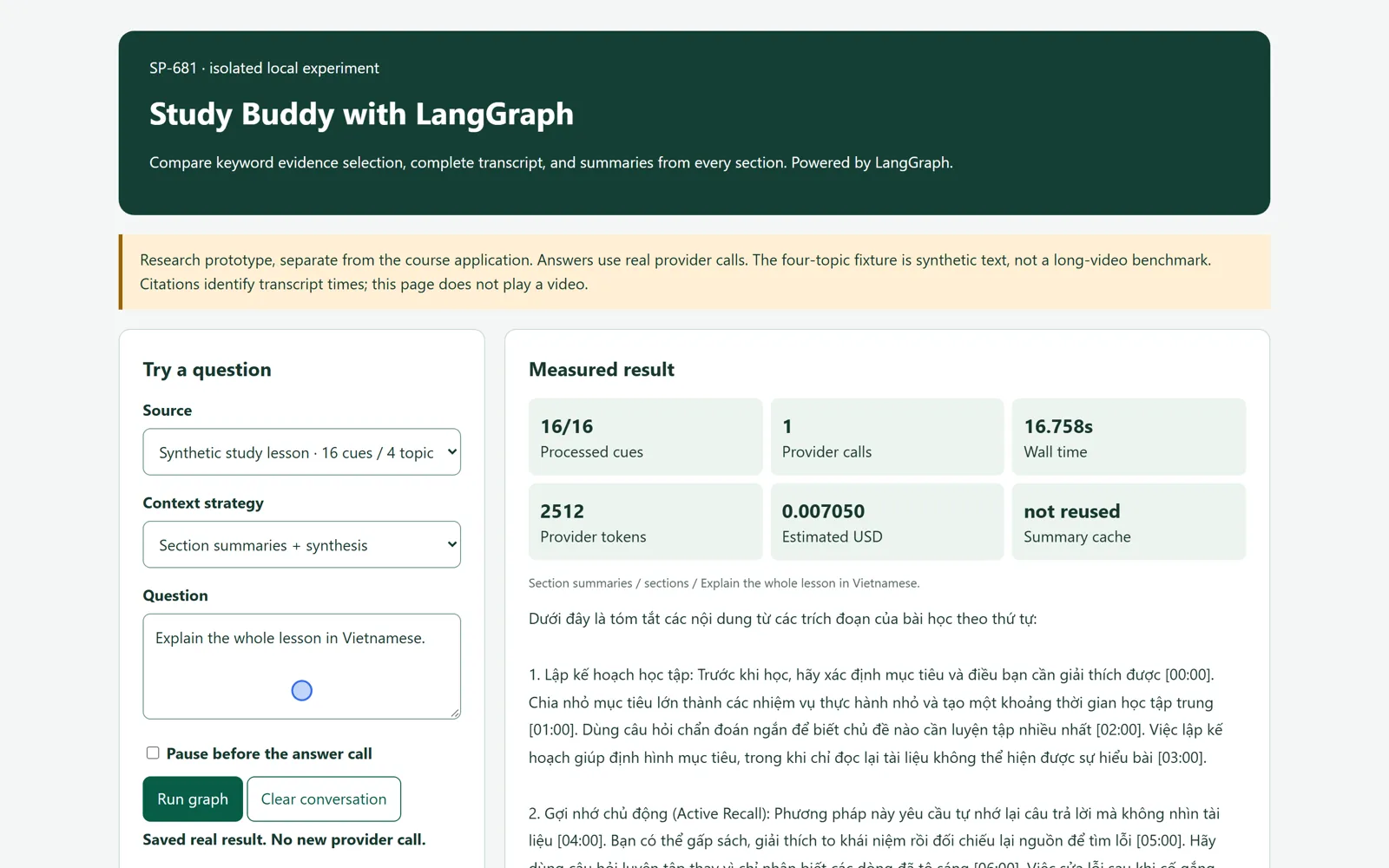
The section workflow has completed its four summary calls and one answer call. Click to open full size. Pause before the answer
On a new complete-transcript run, the source and context steps do not call AI. The graph records the paused state before the answer.
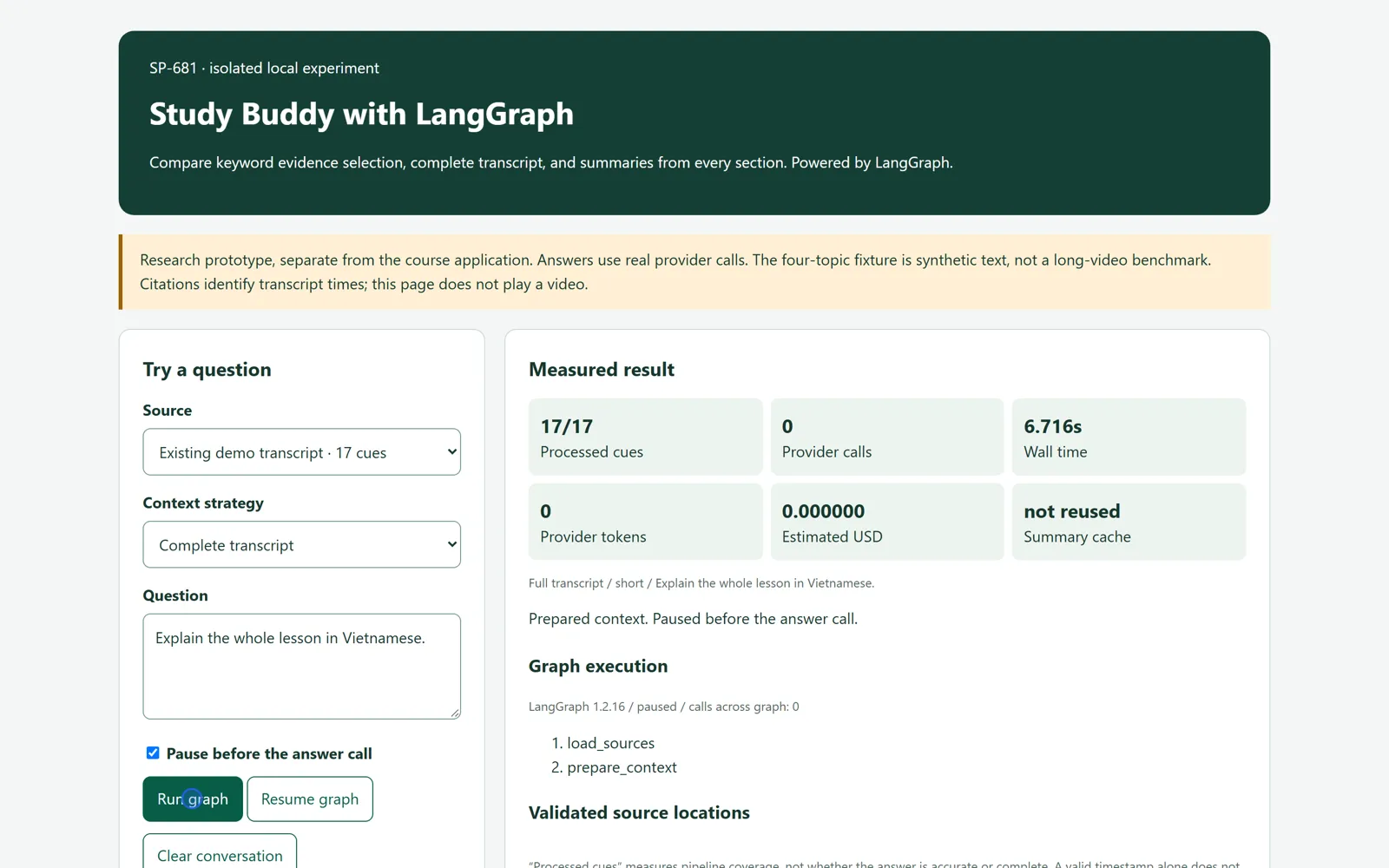
A fresh full-transcript workflow is paused before answering. Provider calls are zero. Click to open full size. Resume and inspect the answer
Resume continues from the saved point. It does not repeat completed preparation steps. In this fresh run, one provider call writes the answer.
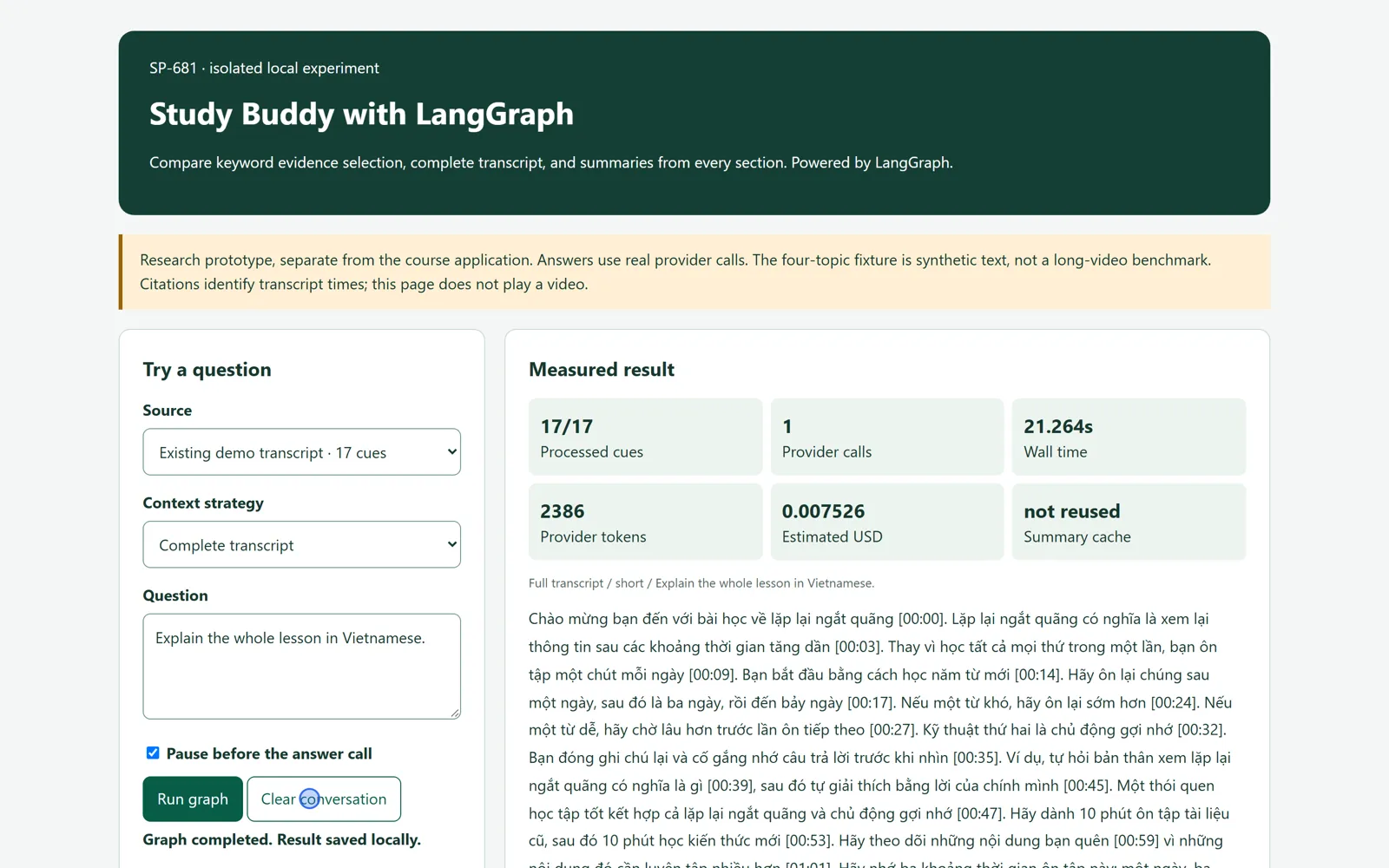
The resumed workflow returns an answer. This invocation made one provider call. Click to open full size.
Reading the counters
| Counter | Meaning | Tested example |
|---|---|---|
| Processed cues | How many source cues entered the preparation path. This is not an answer accuracy score. | 17 of 17 in the short transcript |
| Provider calls | AI calls made by the current invocation. | 0 while paused in the fresh full-text run, then 1 on resume |
| Calls across graph | Calls from the earlier completed steps plus the resumed work. | 4 summary calls + 1 answer call = 5 |
| Summary cache | Whether prepared summaries were reused. | A later follow-up needed 1 answer call |
| Wall time | Includes local process startup, provider work, and measurement. | It is not isolated LangGraph overhead |
A later question can reuse the summaries
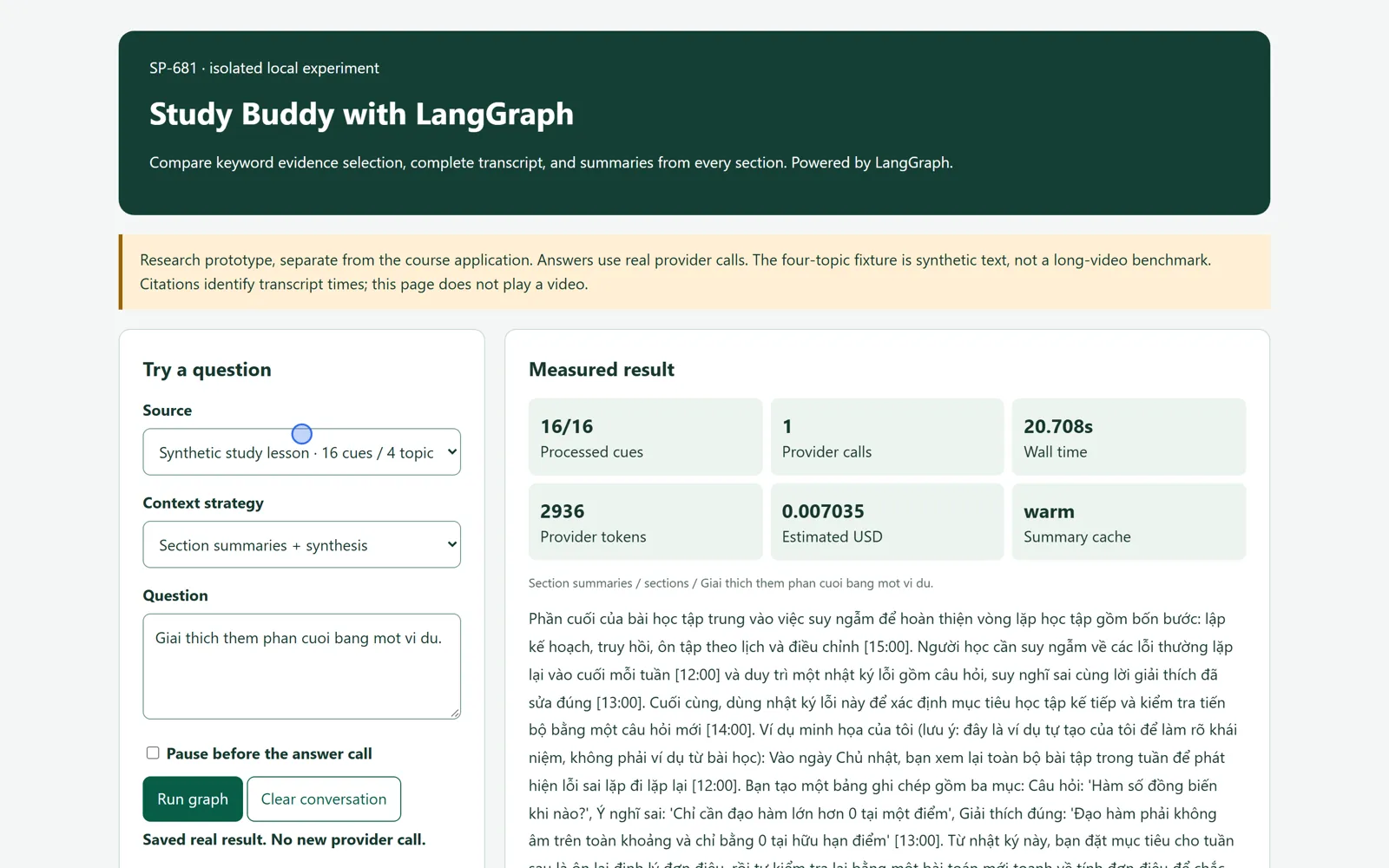
What was verified
- Completed summaries survive the pause. The real summary test made four preparation calls, exited, and resumed in a new process with one answer call.
- Unknown references stop validation. A focused test rejects an answer that cites a source outside the supplied evidence. A valid source ID still needs a semantic support check.
- The browser controls work. A fresh pause and resume was operated through the actual demo interface with no page JavaScript errors.
Measured LangGraph test usage: 14,202 provider tokens, estimated 0.04276950 USD. This covers the recorded verification runs before later manual use. It is a local ledger estimate, not a provider invoice.
Known limits before course integration
- The fixtures are small synthetic transcripts. Evaluate real long lectures before choosing production budgets.
- The demo uses fixed sources. Production enrollment, tenant, trial, and credit checks still need integration.
- LangGraph coordinates work. It does not prove factual accuracy, complete topic coverage, or the correctness of generated examples.
- A crash after provider billing but before saving a checkpoint can still repeat a paid call. Checkpointing is not exactly-once billing.
- A transitive dependency emits a Pydantic V1 warning on Python 3.14. The tested typed-state path passed; broader compatibility remains open.
- Checkpoints are local demo files. Production storage, retention, cancellation, and recovery policies remain to be designed.
- This hosted page is a review artifact. Its step-through diagram is simulated, and it cannot run the local AI demo remotely.
Decisions taken
| Question | Choice |
|---|---|
| Which orchestrator? | LangGraph, as requested, with explicit steps and checkpoints. |
| Which AI integration? | Keep the existing tenant-selected provider adapters and usage records. |
| How do we handle whole-video questions? | Use complete text when it fits. Evaluate summaries built from every section for longer lessons. |
| What is published here? | Curated video and screenshots, plus a browser-only flow explanation. No credentials or live AI endpoint. |
Before rollout
- Review the explanation behavior and generated teaching examples.
- Set token, latency, and cost budgets using real long lessons.
- Integrate the graph with course access, credits, and transcript version checks.
- Set production checkpoint storage and retention, then test failure recovery.
- Complete beta verification before considering a production release.